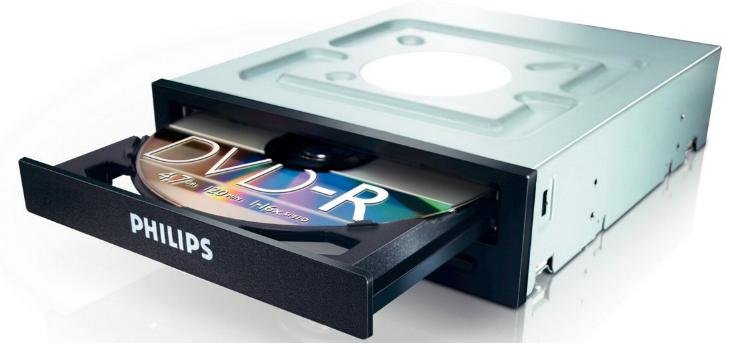
An optical drive is a vital component in a computer that reads and writes data using laser technology. When you insert a disc into your computer, the optical drive springs into action, spinning the disc and utilizing its laser to decode the stored information. This process allows you to install software, watch movies, listen to music, and transfer data seamlessly. Understanding what an optical drive does can help you appreciate its role in your computing experience. Let’s delve deeper into the workings of this essential hardware.

What Does an Optical Drive Do?
Optical drives are an essential part of many electronic devices, but have you ever wondered what they actually do? In this article, we will dive into the world of optical drives to understand their functions, types, and importance in modern technology.
The Basics of Optical Drives
An optical drive is a piece of hardware that uses laser light or electromagnetic waves to read or write data on optical discs. These discs are usually made of plastic and are coated with a reflective material that stores data in the form of microscopic pits and lands.
Reading Data
One of the main functions of an optical drive is to read data from these discs. When you insert a disc into the drive, the laser or electromagnetic waves scan the surface of the disc and interpret the patterns of pits and lands to retrieve the stored information. This data can be anything from music and movies to software programs and documents.
Writing Data
In addition to reading data, optical drives also have the capability to write data onto blank discs. By using a different type of laser or changing the intensity of the laser beam, the drive can create those same pits and lands on a blank disc to store new information.
Types of Optical Drives
There are several types of optical drives available in the market, each with its own set of features and capabilities. The most common types include CD drives, DVD drives, and Blu-ray drives.
CD Drives
CD drives are the oldest type of optical drives and are primarily used to read and write data on CDs (Compact Discs). CDs have a storage capacity of up to 700 MB and are commonly used for storing music albums, software installations, and data backups.
DVD Drives
DVD drives are an evolution of CD drives and have a higher storage capacity of up to 4.7 GB for single-layer discs and 8.5 GB for dual-layer discs. DVDs are widely used for movies, software installations, and data storage due to their larger capacity compared to CDs.
Blu-ray Drives
Blu-ray drives are the most advanced type of optical drives available today. They can read and write data on Blu-ray discs, which have a storage capacity of up to 50 GB for dual-layer discs. Blu-ray discs are commonly used for high-definition movies, large software installations, and data archiving.
Importance of Optical Drives
Optical drives may seem outdated in today’s world of cloud storage and USB drives, but they still hold significance in certain contexts. Here are a few reasons why optical drives are still relevant:
Archiving Data
Optical discs provide a reliable and long-term storage solution for important data that needs to be preserved for extended periods. Unlike hard drives or USB sticks, optical discs are not susceptible to viruses or data corruption, making them ideal for archival purposes.
Physical Distribution
In industries like music, movies, and software, physical distribution of media is still common. Optical discs allow for the distribution of large files in a cost-effective manner, making them a practical choice for content creators.
Compatibility
Many older devices, such as car stereos, gaming consoles, and legacy computers, still rely on optical drives for reading discs. Having an optical drive ensures compatibility with a wide range of devices that may not support newer technologies.
In conclusion, optical drives play a vital role in reading and writing data on optical discs, providing a reliable storage solution for various types of media and files. Understanding the functions and types of optical drives can help you appreciate their importance in the ever-evolving world of technology.
How Does Blu-ray Work? – LaserDisc, CD, DVD, Blu-ray Explained
Frequently Asked Questions
What kinds of tasks can an optical drive perform?
An optical drive is capable of reading, writing, and playing various types of optical discs such as CDs, DVDs, and Blu-rays. It can also install software, play music or movies, and back up data onto discs.
How does an optical drive read data from discs?
An optical drive uses a laser beam to scan the surface of the disc. The laser reads the patterns of bumps and flat areas on the disc, translating them into binary data that the computer can understand.
Can an optical drive be used to create backup copies of files?
Yes, an optical drive can be used to create backup copies of important files on recordable discs like CDs, DVDs, and Blu-rays. This allows users to store their data securely and have a physical backup in case of system failures.
Are there different types of optical drives available on the market?
Yes, there are various types of optical drives available, including CD drives, DVD drives, and Blu-ray drives. Each type is designed to read and write specific types of optical discs, with Blu-ray drives being the most advanced in terms of storage capacity and data transfer speeds.
Final Thoughts
An optical drive reads and writes data on optical discs using a laser beam. It plays a crucial role in accessing and storing information on CDs, DVDs, and Blu-ray discs. Whether installing software, watching movies, or backing up files, an optical drive is essential for many computing tasks. In conclusion, understanding what an optical drive does is fundamental to maximizing its functionality in a technological world where physical media continues to play a significant role.